
Make videos from photos, clips & music in minutes
Simple Video Maker is a tiny, free video editor that runs in your browser. Drag in photos and videos, add transitions, text and music, then export an MP4. Your files never leave your computer.
Why people use it
Photo slideshows with transitions
Drop many photos on one track and transitions are added automatically: fade, slide, zoom, wipe, circle.
Layers that work like you expect
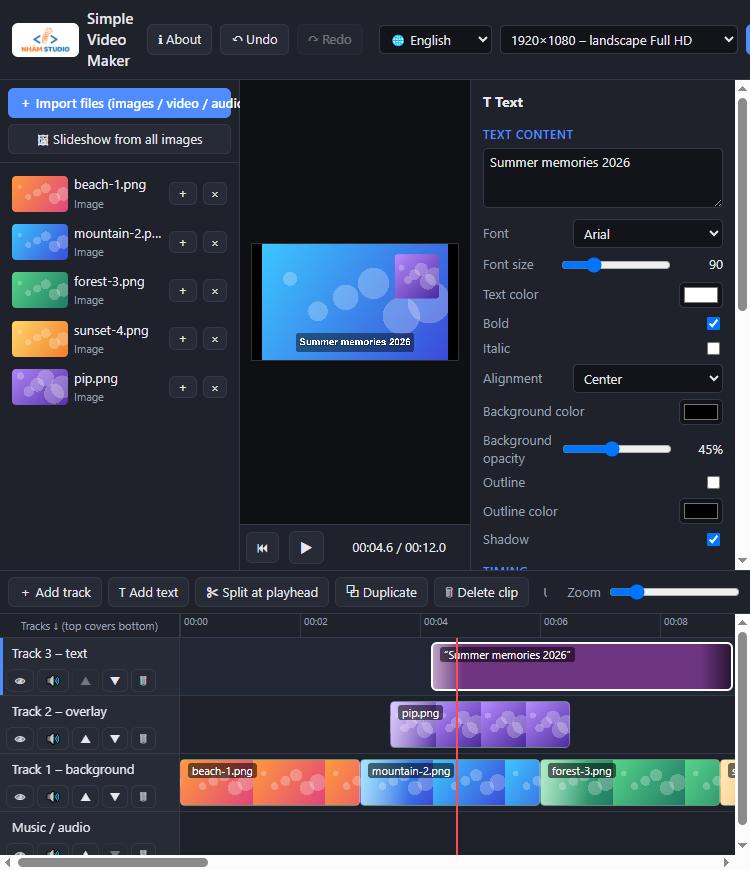
Upper tracks cover lower tracks. Shrink a clip and the layer below shows through – perfect for picture-in-picture, logos and captions.
Text, music & motion
Styled text with outline and shadow, background music with fade in/out, and Ken Burns zoom/pan on photos.
Private by design
Everything is processed on your computer. Nothing is uploaded – your photos and videos stay yours.
Every format you need
Export landscape 16:9 (720p, 1080p, 4K), vertical 9:16 for TikTok / Reels / Shorts, or square 1:1.
Tiny and instant
Under 100 KB. No installer, no admin rights, no account, no watermark, no time limit.
How it works
Download & open
Unzip the file and double-click index.html. It opens in Chrome or Edge.
Drag in your media
Drop photos, videos and music onto the timeline. Add text with one click.
Export MP4
Click Export video and the MP4 is saved straight to your Downloads folder.
Frequently asked questions
Is Simple Video Maker really free?
Yes. It is free, with no watermark, no account and no time limit.
Do I need to install anything?
No. Download the small ZIP, unzip it and open index.html in Google Chrome or Microsoft Edge. You can also use the online version.
Are my photos and videos uploaded anywhere?
No. All editing and exporting happens on your own computer. The app only sends anonymous usage counts (app opened, video exported) to help us improve it, and you can turn that off in the settings.
What format does it export?
MP4 (H.264 + AAC) in Chrome and Edge, up to 4K. Vertical and square formats are supported.
Is it a good Shotcut / Clipchamp alternative?
For simple projects – photo slideshows, combining clips, adding music and captions – it is much easier to learn. For advanced color grading or effects, use a full editor.
Ready to make your first video?
Windows · macOS · Linux · v1.1 · ≈ 90 KB